Too long to read? Check out Paprize
Five years ago, I faced a problem. My web app needed a simple report featuring a header and footer on every page, and a long table spanning multiple pages.
It seemed straightforward enough. To get headers and footers, my application produced an HTML file and used wkhtmltopdf to convert it to PDF. However, the library relied on an outdated WebKit engine, limiting the web features I could use. It had limited capabilities regarding headers and footers, and the library was eventually archived.
The First Attempt: A Puppeteer Hack
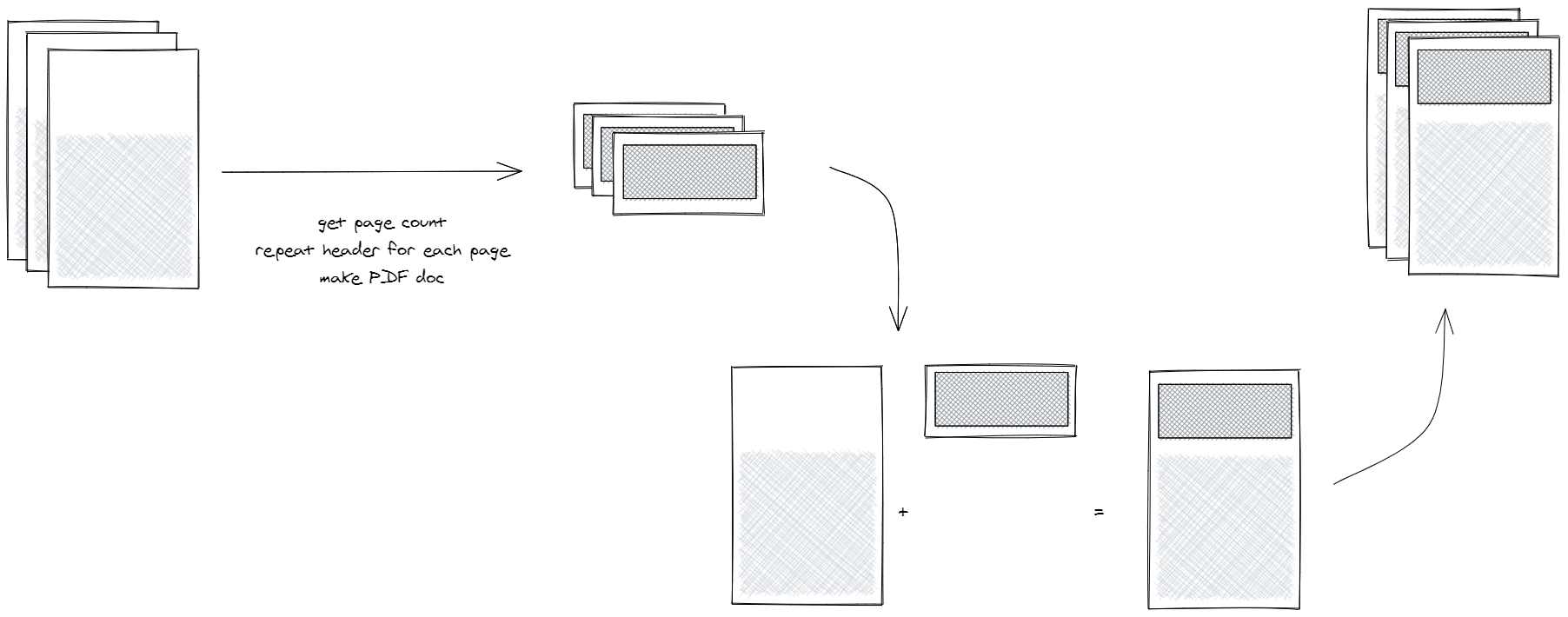
I found a hack to solve my issues. I used standard Puppeteer and Chrome’s toPDF method. To gain full control over headers, footers, and pagination, my algorithm created two sets of PDFs and merged them using pdf-lib.
- Set 1: Contained the actual report content, but with top and bottom margins calculated to leave empty space for the header and footer.
- Set 2: Contained empty pages (based on the page count of Set 1), where the algorithm manually generated the headers and footers with page numbers.
The algorithm then merged these two together to create the final report. The result was the Puppeteer-report library.
This was elegant, but very limited. pdf-lib was eventually abandoned, and merging PDFs broke certain features like hyperlinks. My main issue, however, was that I needed more control over pagination, something like MS Word. I wanted to create sections, have complete control over design and spacing, and make tables look elegant. Specifically, when a table split across multiple pages, I needed the table header to repeat automatically, and I needed a table footer (e.g., to show a sum of orders) at the bottom of the page. Extending this library to support that was impossible.
The Second Attempt: Jikji & React Fiber
The following year, I created Jikji.
This solution was based on React. It allowed me to design reports using React components and provide a custom layout engine instead of relying on the browser to handle pagination. It was even possible to preview the paginated report directly in the web app, allowing users to print it directly or save it as a PDF. It solved my design problems and made creating component based reports easy.
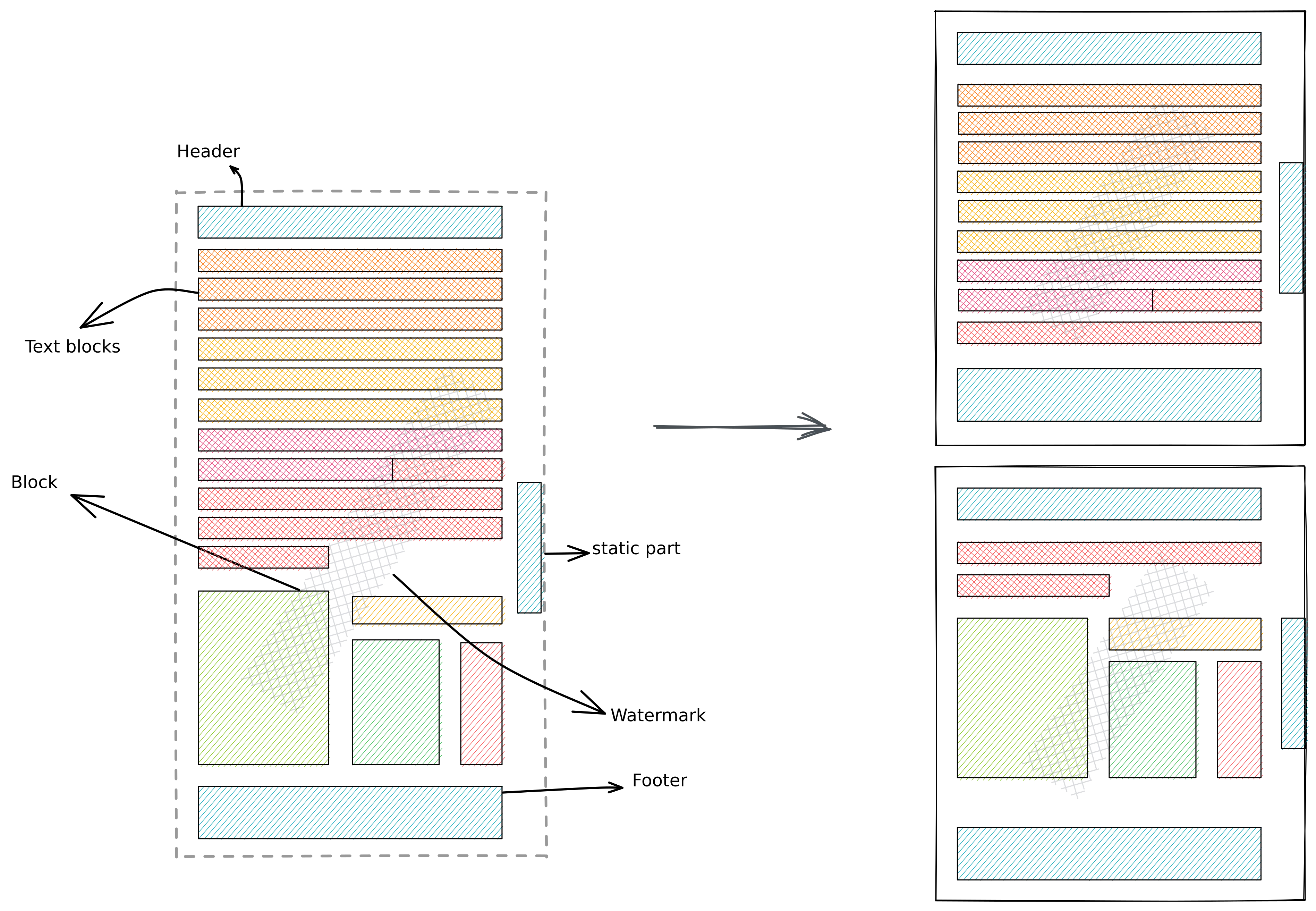
To convert the React App into a report, Jikji hooked into the React Fiber tree. It rearranged components based on page size, injected header and footer components, and recreated the component tree with the new layout.
function MyReport() {
  return (
    <ReportRoot>
      <ReportView>
        <Section dimension={pageSize.A4} margin={pageMargin.Narrow}>
          <SectionHeader>Section Header</SectionHeader>
          <SectionFooter>Section Footer</SectionFooter>
          <PageHeader>Page Header</PageHeader>
          <PageContent>Report Content </PageContent>
          <PageFooter>Page Footer</PageFooter>
        </Section>
      </ReportView>
    </ReportRoot>
  );
}
However, handling pagination required complex calculations. Because of the massive feature set of CSS (like flexbox or floats), the calculation logic was fragile and easy to break. Eventually, with the release of React 19, using the internal React Fiber API became impossible. Furthermore, from a library perspective, it forced users to use React, which was over engineering for simple use cases.
The Solution: Paprize
Eventually, three years later, Paprize was born.
I decided to merge the simple HTML basis of Puppeteer-report with the advanced features of Jikji to find a better solution for handling spacing without complex calculations.
Paprize provides the same idea of component based reports but uses native HTML elements. Instead of complex pre calculations, it uses a very simple algorithm: Tentative Placement.
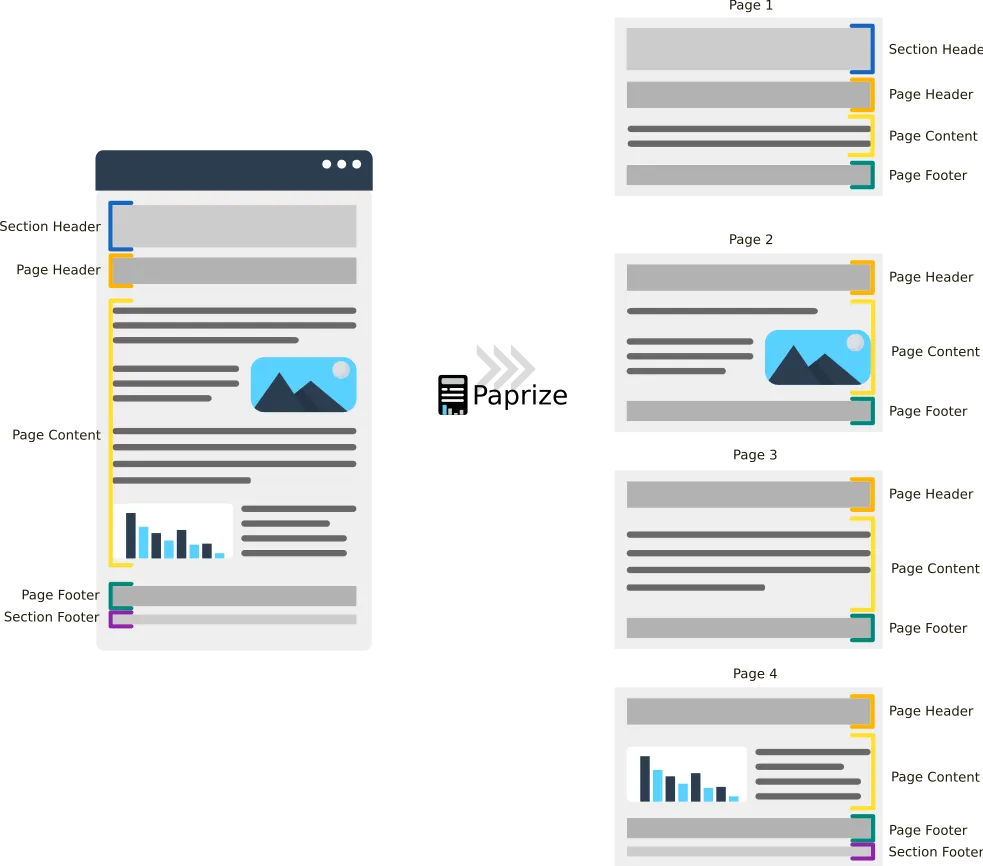
The engine checks if an element’s dimensions fit into the remaining space on the page. It adds the element tentatively. If an overflow occurs, the layout engine rolls back and tries to apply the same logic to the child nodes of that element to split it gracefully.
This gives the algorithm full control over pagination and allows for the customization of any layout behavior. Combined with the plugin system, it provides a clean way to decouple the core logic from the specific customization needed for different elements.
The layout engine is much more feature rich and complex, but the core idea remains as I explained: simple, native, and controllable.
<div data-pz-preview>
    <div data-pz-section>
        <div data-pz-page-header>
            <h2>Page <span data-pz-v-page-number></span></h2>
        </div>

        <div data-pz-page-content>...</div>
    </div>
</div>
For instance, the TablePlugin can repeat the table header on each page and avoid semantically wrong breaks, such as putting a table header at the very end of a page without any rows beneath it.
Since Paprize is based on native HTML, adding a React wrapper to it was straightforward, and it can easily support other frontend libraries and frameworks.
function MyReport() {
  return (
    <ReportRoot>
      <ReportPreview>
        <Section size={pageSize.A4}>
          <PageContent>...</PageContent>
        </Section>

        <Section size={pageSize.A5}>
          <PageHeader>Page Header</PageHeader>

          <PageContent>
            ...
          </PageContent>

          <PageFooter>Page Footer</PageFooter>
        </Section>
      </ReportPreview>
    </ReportRoot>
  );
}
I would be happy to suggest Paprize next time you need to create astonishing reports for your application.